
Script Lint
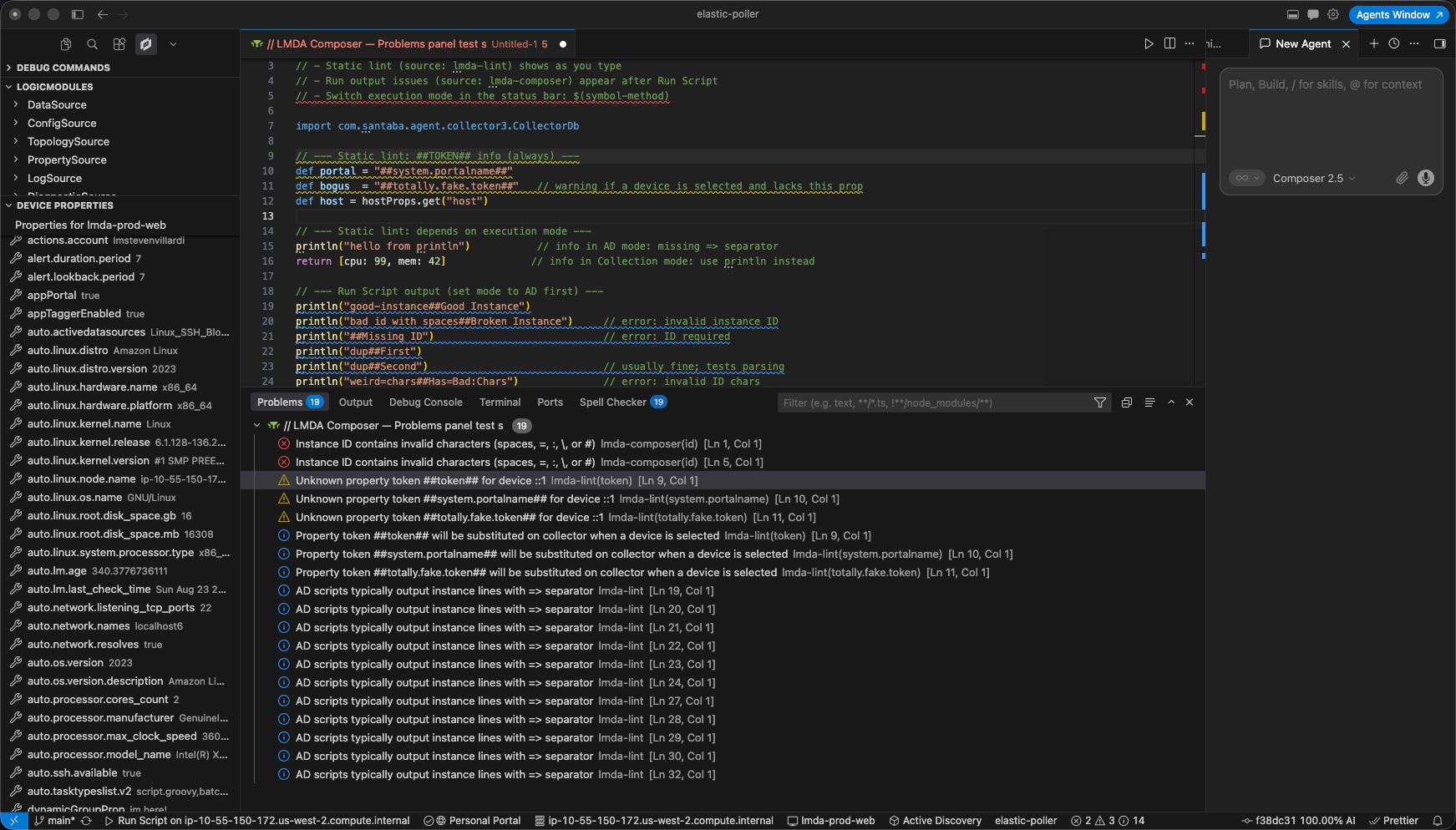
LMDA Composer runs static lint while you edit Groovy and PowerShell scripts. Issues appear in the Problems panel under the lmda-lint source — separate from run-time validation when you execute a script.
Enable lint
Section titled “Enable lint”Lint is on by default. Toggle it with lmda.enableModuleLint in Settings, or search @lmda lint.
Lint respects your lmda.executionMode setting (freeform, ad, collection, batchcollection) and, when a script is loaded from the LogicModules browser, the bound module type (for example PropertySource).
What lint checks
Section titled “What lint checks”Rules are inspired by LogicMonitor monitoring-recipes patterns and LogicMonitor module scripting conventions.
Property and token references
Section titled “Property and token references”| Pattern | Severity | What it means |
|---|---|---|
hostProps.get("name") | Info | Property will be substituted on the collector when a device is selected |
##TOKEN## in PowerShell | Info | Token will be substituted when a device is selected |
| Unknown property on selected device | Warning | Property name was not found on the device you picked in the status bar |
When a device is selected and the portal API is reachable, LMDA validates host property names against live device properties.
PropertySource naming
Section titled “PropertySource naming”PropertySource scripts may only assign auto.* properties or system.categories. Other system.* names are errors.
// Goodprintln "auto.cisco.serial_number=" + serialemit.property("auto.vendor", vendor)
// Error — system.hostname cannot be set by a PropertySourceprintln "system.hostname=" + hostname
This matches LogicMonitor guidance: PropertySources discover inventory-style properties with the auto. prefix. See Creating PropertySources and examples in monitoring-recipes.
BatchScript (batch collection mode)
Section titled “BatchScript (batch collection mode)”When execution mode is batchcollection, lint flags patterns that break batch scripts:
| Issue | Severity |
|---|---|
instanceProps.get() inside BatchScript source | Error — use datasourceinstanceProps and iterate instances |
##WILDVALUE## in BatchScript source | Warning — wildvalues belong in datapoint keys, not script source |
##WILDALIAS## in BatchScript source | Warning — not available inside BatchScript source |
PowerShell output
Section titled “PowerShell output”| Issue | Severity |
|---|---|
Write-Host for collection data | Warning — use Write-Output so stdout reaches the collector; Write-Host can cause BatchScript timeouts |
Debug-style Write-Host lines (for example with $debug) are ignored.
Execution mode hints (Groovy)
Section titled “Execution mode hints (Groovy)”| Mode | Hint |
|---|---|
ad | println without => or ## may not match AD instance line format |
collection | Returning a map/list with return [...] — collection output is usually printed or emitted |
Related settings
Section titled “Related settings”| Setting | Role |
|---|---|
lmda.enableModuleLint | Turn static lint on or off |
lmda.executionMode | BatchScript, AD, and collection hint rules |
lmda.defaultDeviceHostname | Device used when validating property tokens |
See Settings for the full list.