
Snippets Library
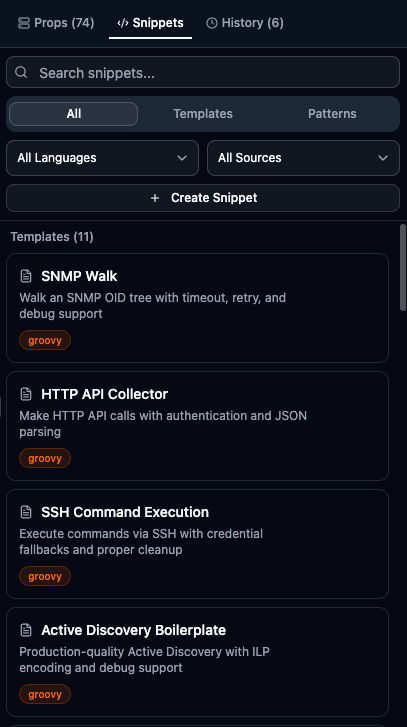
The Snippets Library provides reusable code templates and patterns for common LogicMonitor scripting tasks.
Accessing Snippets
Section titled “Accessing Snippets”| Method | Action |
|---|---|
| Sidebar | Click Snippets tab in the right sidebar |
| Keyboard Shortcut | Press Ctrl+K, L / Cmd+K, L to open directly |
| Command Palette | Press Cmd+Shift+P and type “Snippets” |
Snippet Types
Section titled “Snippet Types”Complete script starters that replace your entire script content.
Use templates when:
- Starting a new script from scratch
- Learning standard script patterns
- Need a complete working example
Code fragments that insert at your cursor position.
Use patterns when:
- Adding functionality to an existing script
- Inserting common boilerplate code
- Using standard coding patterns
Patterns are inserted without replacing existing content.
Snippet Categories
Section titled “Snippet Categories”By Type
Section titled “By Type”| Badge | Description |
|---|---|
| Template | Complete script starters that replace your entire script |
| Pattern | Code fragments that insert at cursor position |
By Language
Section titled “By Language”Snippets are language-specific:
- Groovy snippets for Groovy scripts
- PowerShell snippets for PowerShell scripts
Use the filter to show only relevant snippets for your current language.
By Source
Section titled “By Source”| Badge | Description |
|---|---|
| Built-in | Included with LMDA Composer |
| User | Your custom snippets |
Using Built-in Snippets
Section titled “Using Built-in Snippets”-
Open the Snippets panel from the sidebar
-
Use filters to narrow by category, language, or type
-
Click a snippet to preview its full content
-
Click Insert to add the snippet to your editor
Popular Built-in Snippets
Section titled “Popular Built-in Snippets”| Name | Description |
|---|---|
| SNMP Walk | Walk an SNMP OID tree and process results |
| HTTP API Collector | Make HTTP API calls and parse JSON response |
| WMI Query Template | Execute WMI queries on Windows devices |
| SSH Command Executor | Run commands via SSH and collect output |
| Name | Description |
|---|---|
| SNMP Get Single | Get a single SNMP OID value |
| JSON Response Parser | Parse JSON and extract values |
| Try-Catch Block | Error handling wrapper |
| AD Instance Line | Format Active Discovery output |
| Collection Output | Format key=value collection output |
| Name | Description |
|---|---|
| WMI Query | Execute WMI queries |
| Registry Read | Read Windows registry values |
| Service Status | Check Windows service status |
| Performance Counter | Read performance counters |
Creating Custom Snippets
Section titled “Creating Custom Snippets”-
Click Create Snippet in the panel
-
Fill in required fields:
- Name: Unique identifier
- Category: Organization category
- Language: Groovy or PowerShell
- Type: Template or Pattern
- Content: The actual code
-
Optionally add description and tags
-
Click Save
Example Pattern
Section titled “Example Pattern”// SNMP Walk Pattern// TODO: Set target OIDdef baseOid = "1.3.6.1.2.1.2.2.1"def host = hostProps.get("system.hostname")def community = hostProps.get("snmp.community")
def results = Snmp.walk(host, community, baseOid)results.each { oid, value -> println "${oid} = ${value}"}Managing Custom Snippets
Section titled “Managing Custom Snippets”| Action | Description |
|---|---|
| Edit | Click the edit icon on your snippet, modify details, and save |
| Delete | Click the delete icon and confirm. Deleted snippets cannot be recovered. |
Snippet Organization
Section titled “Snippet Organization”Naming Conventions
Section titled “Naming Conventions”Use clear, descriptive names:
SNMP_Walk_Interface_StatsHTTP_GET_With_AuthWMI_CPU_Query
Add relevant tags for searchability:
- Technology:
snmp,wmi,http - Purpose:
discovery,collection - Module type:
datasource,configsource
Best Practices
Section titled “Best Practices”- Create for Repeated Code — If you write similar code often, generalize it with placeholders and save as a snippet
- Maintain Your Library — Periodically review, update outdated snippets, and remove unused ones
- Document Your Snippets — Include what it does, required variables, expected output, and limitations
- Use TODO Markers — Add
// TODO:comments where users need to customize the code
Snippet Workflow Example
Section titled “Snippet Workflow Example”Building a new DataSource:
-
Start with Basic DataSource template
-
Add SNMP Walk pattern for discovery
-
Add Instance Output pattern for AD formatting
-
Add SNMP Get pattern for collection
-
Customize for your specific use case