
Settings
The Settings dialog lets you customize LMDA Composer to match your preferences and workflow.
Opening Settings
Section titled “Opening Settings”| Method | Action |
|---|---|
| Keyboard | Ctrl+, / Cmd+, |
| Command Palette | Press Cmd+Shift+P and type “Settings” |
| Menu | Actions → Settings |
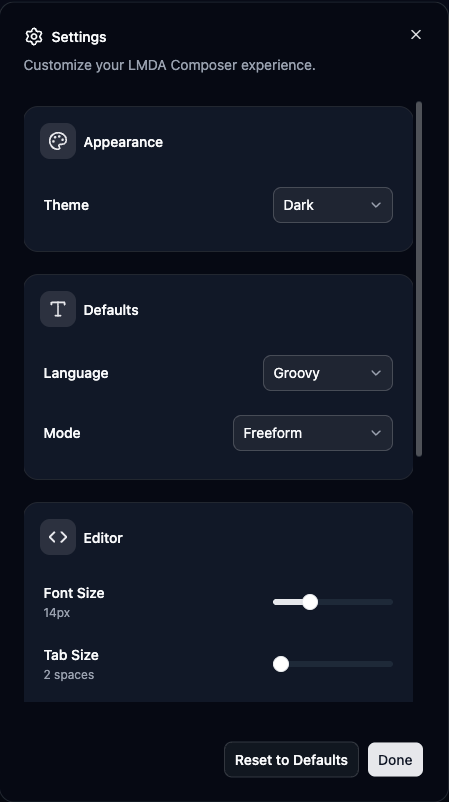
Settings Categories
Section titled “Settings Categories”| Option | Description |
|---|---|
| System | Follow OS light/dark setting |
| Light | Always use light theme |
| Dark | Always use dark theme |
The theme applies immediately when changed.
Default Language
Section titled “Default Language”Choose the language for new files:
- Groovy (default)
- PowerShell
Default Mode
Section titled “Default Mode”Choose the execution mode for new files:
- Freeform (default)
- Active Discovery
- Collection
- Batch Collection
Font Size
Section titled “Font Size”- Range: 10px to 24px
- Default: 14px
- Changes apply to all tabs
Tab Size
Section titled “Tab Size”- Range: 2 to 8 spaces
- Default: 2 spaces
- Affects new indentation
Word Wrap
Section titled “Word Wrap”- On (default): Lines wrap within viewport
- Off: Horizontal scroll for long lines
Minimap
Section titled “Minimap”- Show: Display minimap on right for quick navigation
- Hide (default): No minimap, more editor space
History Size
Section titled “History Size”Maximum execution history entries to keep:
- Range: 10 to 500
- Default: 50
- Oldest entries removed when exceeded
API History Limit
Section titled “API History Limit”Maximum API requests to store:
- Range: 10 to 200
- Default: 10
Response Size Limit
Section titled “Response Size Limit”Maximum response size to display:
- Default: 250,000 bytes (~250KB)
- Larger responses truncated for performance
- Full response still available via copy
Default Values Summary
Section titled “Default Values Summary”| Setting | Default |
|---|---|
| Theme | System |
| Default Language | Groovy |
| Default Mode | Freeform |
| Font Size | 14px |
| Tab Size | 2 spaces |
| Word Wrap | On |
| Minimap | Hidden |
| History Size | 50 |
| API History Limit | 10 |
| Response Size Limit | 250KB |
Applying Settings
Section titled “Applying Settings”Immediate Changes
Section titled “Immediate Changes”Most settings apply immediately:
- Theme changes instantly
- Font size updates all tabs
- No refresh required
New File Settings
Section titled “New File Settings”Some settings affect only new files:
- Default language
- Default mode
- Tab size for new indentation
Existing tabs keep their current settings.
Resetting to Defaults
Section titled “Resetting to Defaults”-
Scroll to bottom of Settings dialog
-
Click Reset to Defaults
-
Confirm the action
-
All settings restored to defaults
Settings Storage
Section titled “Settings Storage”Where Settings Are Stored
Section titled “Where Settings Are Stored”Settings persist in:
- Browser local storage
- Per-browser (not synced)
- Survive browser restarts
Clearing Settings
Section titled “Clearing Settings”Settings are cleared when:
- You reset to defaults
- Browser data is cleared
- Extension is uninstalled/reinstalled
Recommended Settings
Section titled “Recommended Settings”For large/high-resolution displays:
- Font Size: 16-18px
- Minimap: Show
- Word Wrap: Off
For laptops or smaller screens:
- Font Size: 12-14px
- Minimap: Hide
- Word Wrap: On
For PowerShell development:
- Default Language: PowerShell
- Tab Size: 4 (PowerShell convention)
For rapid script testing:
- Default Mode: Freeform
- History Size: 200+ (keep more history)
Keyboard Shortcuts in Settings
Section titled “Keyboard Shortcuts in Settings”While in Settings dialog:
| Key | Action |
|---|---|
| Escape | Close dialog |
| Tab | Move to next field |
| Enter | Apply selection |
Settings vs. Tab State
Section titled “Settings vs. Tab State”| Category | Description |
|---|---|
| Settings (Global) | Configured in Settings dialog. Apply to all sessions, persist across restarts. |
| Tab State (Per-Tab) | Managed per tab: language selection, execution mode, script content. |
| Session State | Temporary: open tabs, sidebar state, last used collector. |
Troubleshooting Settings
Section titled “Troubleshooting Settings”- Settings Not Saving — Check browser storage isn’t full. Verify extension has storage permission. Try clearing and re-setting.
- Theme Not Applying — Refresh the page. Check OS theme setting. Try a specific theme instead of System.
- Editor Changes Not Visible — Check you’re on a script tab. Try switching tabs. Reload the extension page.
Next Steps
Section titled “Next Steps” Keyboard Shortcuts Complete reference for LMDA Composer keyboard shortcuts.