
Module Snippets
Module Snippets are LogicMonitor’s library of reusable Groovy code modules. These modules provide helper functions for common tasks like data emission, debugging, API calls, and vendor-specific integrations.
Accessing Module Snippets
Section titled “Accessing Module Snippets”| Method | Action |
|---|---|
| Keyboard Shortcut | Press Ctrl+K, L / Cmd+K, L to open directly |
| Command Palette | Press Cmd+Shift+P and type “Module Snippets” |
How It Works
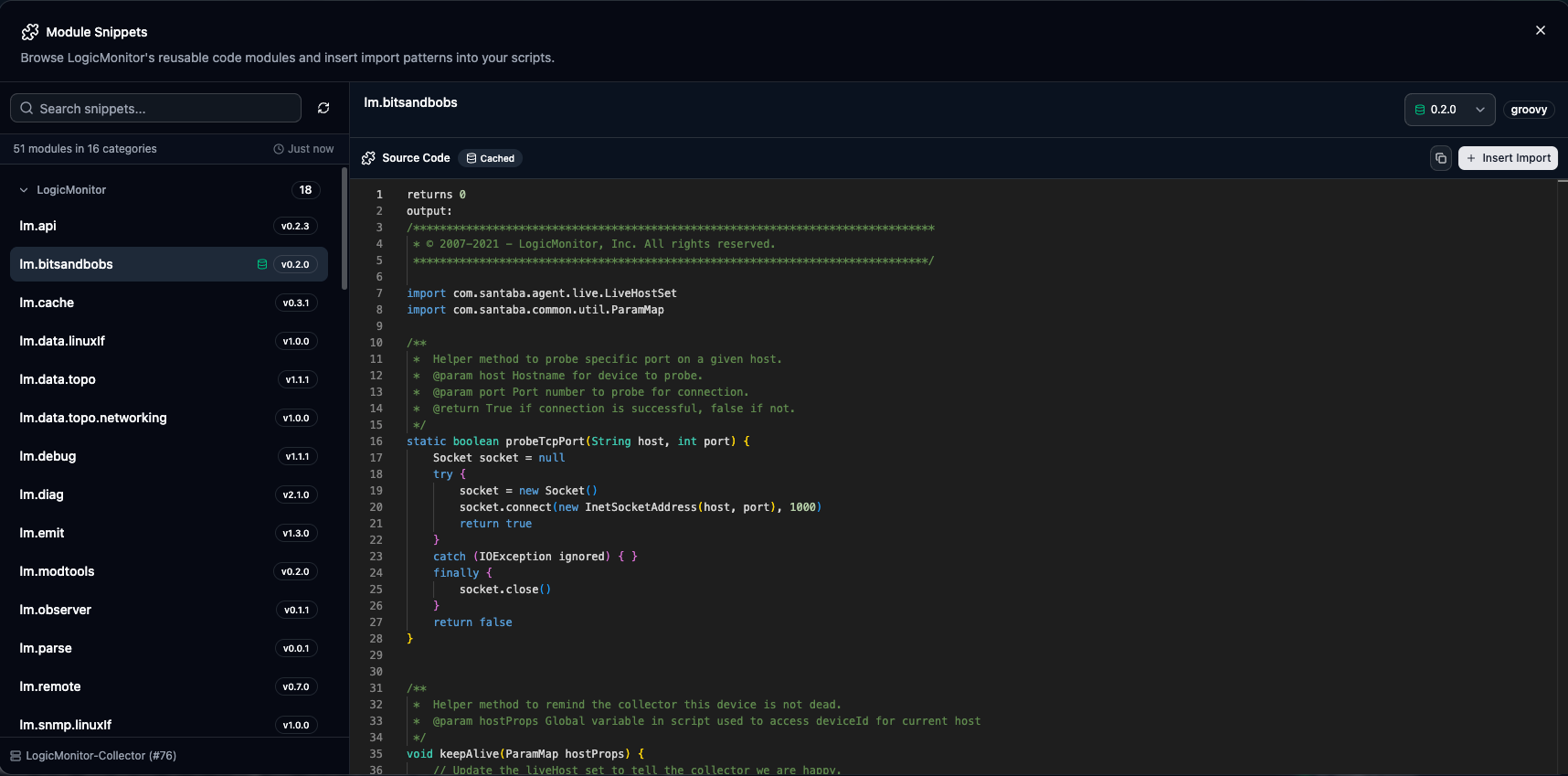
Section titled “How It Works”Module Snippets are fetched from your portal via a connected collector. The dialog displays all available modules grouped by category with full source code preview.
-
Open the Module Snippets dialog
-
Click Fetch Module Snippets to retrieve the list from your collector (first time only)
-
Browse categories or search for a specific module
-
Select a module to preview its full source code
-
Choose a version if multiple are available
-
Click Insert Import to add the loader boilerplate to your script
Module Categories
Section titled “Module Categories”Modules are organized by vendor and functionality:
| Category | Examples | Description |
|---|---|---|
| LogicMonitor | lm.emit, lm.debug, lm.cache | Core LM helpers for data emission, debugging, and caching |
| Cisco | cisco.meraki, cisco.aci | Cisco Meraki, ACI, and network device integrations |
| VMware | vmware.vsphere | vSphere, vCenter, and virtualization helpers |
| Aruba | aruba.* | Aruba network device integrations |
| Palo Alto | paloalto.* | Firewall and security integrations |
| NetApp | netapp.* | Storage system integrations |
| Juniper | juniper.* | Network device integrations |
| Protocols | proto.http, proto.snmp | Protocol-specific helpers |
| Loader | loader.* | Module loading utilities |
The Import Boilerplate
Section titled “The Import Boilerplate”When you click Insert Import, LMDA Composer inserts the proper module loader boilerplate at your cursor position. This is the standard pattern for loading LogicMonitor modules:
/******************************************************************************* * Module Snippet: lm.emit ******************************************************************************/import com.logicmonitor.common.sse.utils.GroovyScriptHelper as GSHimport com.logicmonitor.mod.Snippets
def modLoader = GSH.getInstance()._getScript("Snippets", Snippets.getLoader()).withBinding(getBinding())def emit = modLoader.load("lm.emit", "1")
Understanding the Import
Section titled “Understanding the Import”| Component | Purpose |
|---|---|
GroovyScriptHelper | LogicMonitor’s script execution helper |
Snippets.getLoader() | Retrieves the module loader from the collector |
withBinding(getBinding()) | Passes the current script context to the module |
modLoader.load(name, version) | Loads the specified module at the given major version |
Variable Naming
Section titled “Variable Naming”The variable name is automatically derived from the module name:
| Module Name | Variable |
|---|---|
lm.emit | emit |
cisco.meraki | meraki |
proto.http | http |
lm.data.topo | topo |
Version Management
Section titled “Version Management”Each module can have multiple versions available:
| Feature | Description |
|---|---|
| Latest Version | Shown by default with a latest badge. Recommended for new scripts. |
| Version Selector | Use the dropdown to select older versions for compatibility with existing scripts. |
| Major Versions | The import uses the major version number only (e.g., "1" for version 1.3.0). |
Source Code Preview
Section titled “Source Code Preview”The right panel shows the complete source code of the selected module:
- Full syntax highlighting with Groovy support
- Copy button to copy the entire source to clipboard
- Read-only editor for browsing and searching within the code
- Version indicator showing which version you’re viewing
Caching
Section titled “Caching”Module Snippets uses intelligent caching to minimize collector requests:
| Cache Type | Behavior |
|---|---|
| Module List | Cached after first fetch. Shows collector name and timestamp. |
| Source Code | Cached per module+version when viewed. Shows green database icon. |
Cache Indicators
Section titled “Cache Indicators”- Green database icon on a module = at least one version’s source is cached
- Green database icon on version = that specific version is cached locally
- Timestamp in footer shows when the list was last fetched
Refreshing
Section titled “Refreshing”Click the Refresh button next to the search box to fetch an updated module list from the collector. This is useful if new modules have been added to your portal.
Using Loaded Modules
Section titled “Using Loaded Modules”Once a module is loaded, you can call its methods. Each module has its own API—preview the source to see available functions.
Example: Using lm.emit
Section titled “Example: Using lm.emit”// After loading the emit moduledef emit = modLoader.load("lm.emit", "1")
// Use the emit helper to output datapointsemit.dataPoint("cpuUsage", 75.5)emit.dataPoint("memoryUsage", 82.3)Example: Using cisco.meraki
Section titled “Example: Using cisco.meraki”// After loading the meraki moduledef meraki = modLoader.load("cisco.meraki", "1")
// Use Meraki API helpersdef orgs = meraki.getOrganizations(apiKey)orgs.each { org -> println "Organization: ${org.name}"}Best Practices
Section titled “Best Practices”- Use Latest Versions — Start with the latest version unless you need specific compatibility with existing scripts
- Review Source First — Preview the module source to understand its API before importing
- One Loader Per Script — The modLoader setup only needs to be included once per script, even if loading multiple modules
- Check Module Updates — Periodically refresh the module list to see if newer versions are available
Loading Multiple Modules
Section titled “Loading Multiple Modules”If you need multiple modules, include the loader setup once and call load() multiple times:
/******************************************************************************* * Module Snippets ******************************************************************************/import com.logicmonitor.common.sse.utils.GroovyScriptHelper as GSHimport com.logicmonitor.mod.Snippets
def modLoader = GSH.getInstance()._getScript("Snippets", Snippets.getLoader()).withBinding(getBinding())def emit = modLoader.load("lm.emit", "1")def http = modLoader.load("proto.http", "1")def cache = modLoader.load("lm.cache", "1")
// Now use all three modules in your script