
LogicModule Search
LogicModule Search provides powerful search capabilities across all scripts and datapoints in your portal’s LogicModules.
Opening Search
Section titled “Opening Search”| Method | Action |
|---|---|
| Welcome Screen | Click Search LogicModules on the welcome screen |
| Command Palette | Press Ctrl+Shift+P and type “Search” |
| Keyboard Shortcut | Press Cmd+K, S to open directly |
Search Modes
Section titled “Search Modes”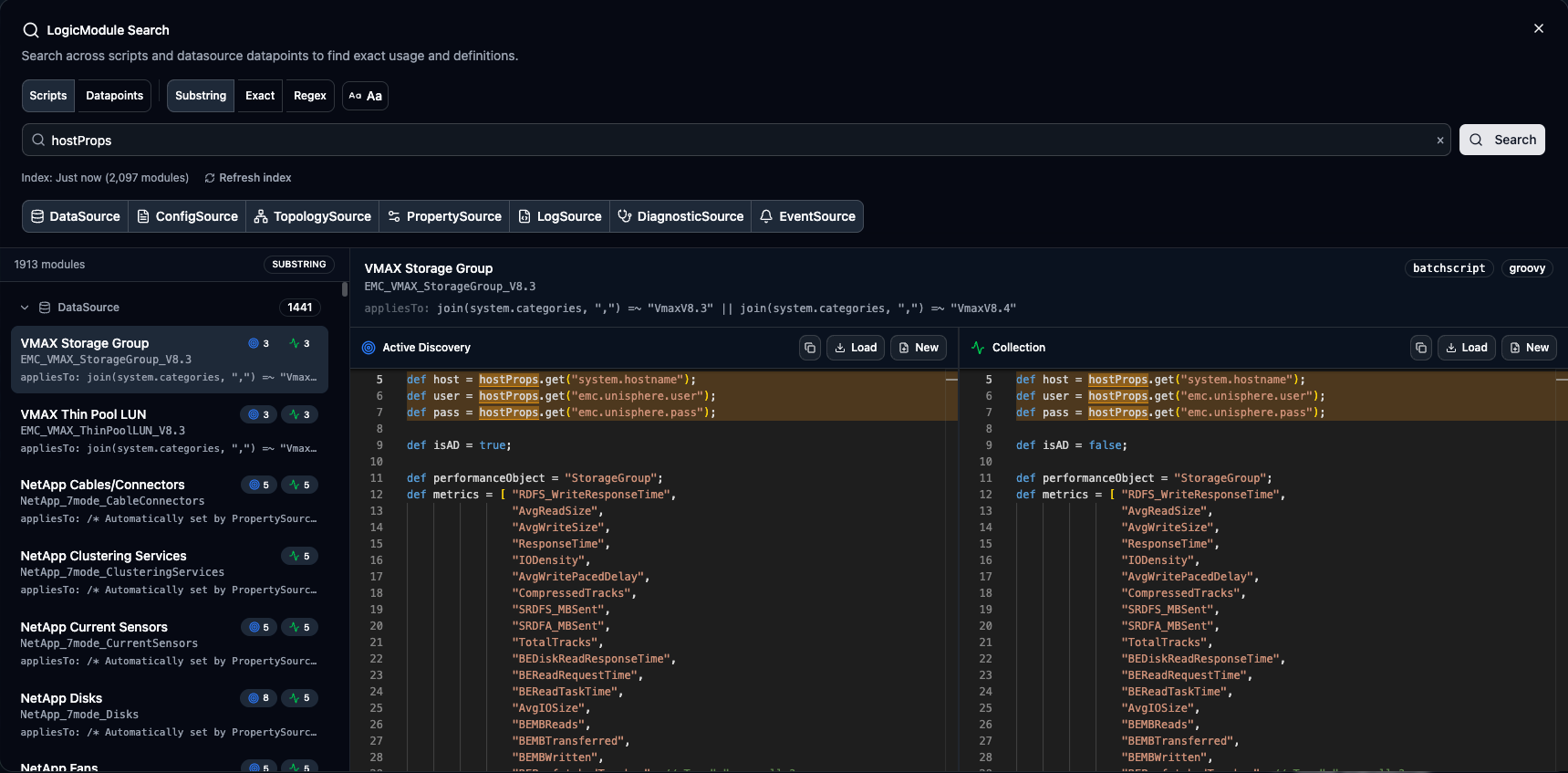
Search within module script content:
- Collection scripts
- Active Discovery scripts
- Pre-scripts
- PropertySource scripts
- ConfigSource scripts
Find code patterns, function calls, variable names, or any text within scripts.
Search datapoint definitions across all DataSource types:
- Scripted DataSources (Groovy, PowerShell)
- SNMP DataSources
- WMI DataSources
- And more…
Search by:
- Datapoint names
- Datapoint expressions
- Alert thresholds
- Description text
Useful for finding datapoints by name or auditing alert configurations.
Toggle between modes using the tabs at the top of the search dialog.
Search Options
Section titled “Search Options”Match Type
Section titled “Match Type”| Type | Behavior | Example |
|---|---|---|
| Substring | Partial match anywhere | host matches hostname, hostProps |
| Exact | Whole word match only | host won’t match hostname |
| Regex | Regular expression pattern | host\w+ matches hostname, hostProps |
Case Sensitivity
Section titled “Case Sensitivity”Toggle case sensitivity in the search options:
- Case Insensitive (default) – “Host” matches “host”, “HOST”
- Case Sensitive – Only exact case matches
Module Type Filter
Section titled “Module Type Filter”Filter search to specific module types:
Select multiple types to include, or none to search all module types.
Script Search Results
Section titled “Script Search Results”Results Display
Section titled “Results Display”Results are grouped by module type, then by module:
DataSource (12 matches)├── Module_Name_1 (3 matches)│   ├── AD Script - Line 45│   └── Collection Script - Line 12, 78├── Module_Name_2 (1 match)│   └── Collection Script - Line 156
ConfigSource (5 matches)└── Config_Module_1 (5 matches)    └── Script - Lines 23, 45, 67, 89, 101
Match Preview
Section titled “Match Preview”Click a result to see the script with matches highlighted:
- Monaco editor with syntax highlighting
- Matching lines highlighted in yellow
- Jump to match buttons for navigation
- Context lines around each match
Loading Scripts
Section titled “Loading Scripts”From search results, you have two options:
| Action | Result |
|---|---|
| Load | Opens in new module-bound tab (for editing and committing) |
| New | Opens as freeform tab (for reference or experimentation) |
Datapoint Search Results
Section titled “Datapoint Search Results”Datapoint Results Display
Section titled “Datapoint Results Display”Shows datapoints matching your query:
DataSource_Name├── cpuUsage (alert: >, threshold: 90)├── cpuIdle (alert: <, threshold: 10)└── cpuCount (no alert)Match Indicators
Section titled “Match Indicators”Results show how the datapoint matched your query:
- Name match — Query found in the datapoint name
- Description match — Query found in the datapoint description
This helps you quickly identify why a result appeared and focus on the most relevant matches.
Datapoint Details
Section titled “Datapoint Details”Click a datapoint result to view:
| Field | Description |
|---|---|
| Name | Datapoint identifier |
| Type | Gauge, counter, derive |
| Alert Expression | Threshold configuration |
| Description | Documentation text |
| Post-Processor | Transformations |
LMX Links
Section titled “LMX Links”Search results include direct links to view the module on LogicMonitor Exchange when available. Click the icon to open the module in LMX.
Search Index
Section titled “Search Index”LogicModule Search uses a local index for fast searching across your portal.
Index Status
Section titled “Index Status”The status bar shows:
- Last indexed: When the index was built
- Module count: Number of indexed modules
- Index age: Time since last update
Building the Index
Section titled “Building the Index”The index builds automatically on first search. To manually rebuild:
-
Click Rebuild Index in the search dialog
-
Wait for indexing to complete (progress shown)
-
Index is cached for future sessions
Regular Expression Tips
Section titled “Regular Expression Tips”When using Regex mode:
Common Patterns
Section titled “Common Patterns”| Pattern | Matches |
|---|---|
println.*hostname | Print statements with hostname |
def\s+\w+\s*= | Variable definitions |
Snmp\.(get|walk) | SNMP operations |
\d{1,3}\.\d{1,3}\.\d{1,3}\.\d{1,3} | IP addresses |
hostProps\.get\( | Host property access |
Escaping Special Characters
Section titled “Escaping Special Characters”Remember to escape regex special characters:
\.for literal period\(for literal parenthesis\[for literal bracket
Performance Tips
Section titled “Performance Tips”Large Portals
Section titled “Large Portals”For portals with many modules:
- Use module type filters to narrow scope
- Be specific with search terms
- Use exact match when possible
- Rebuild index if search seems slow
Efficient Searching
Section titled “Efficient Searching”- Start broad, then refine with additional terms
- Use regex for complex patterns
- Filter by module type early
- Check index age before searching
Use Cases
Section titled “Use Cases”- Finding Examples — Search for
Snmp.walkwith Substring match to find SNMP walk examples across all modules. - Locating Specific Code — Search for
hostProps.get("custom.property")with Exact match to find all uses of a specific property. - Auditing Patterns — Use Regex like
old_deprecated_function\(to find modules needing updates. - Datapoint Discovery — Switch to Datapoint Search and enter “CPU” to find all CPU-related datapoints and their alert configs across all DataSource types.