
Execution Modes
LMDA Composer supports four execution modes, each designed for different LogicModule scripting scenarios. The selected mode determines how output is parsed and validated.
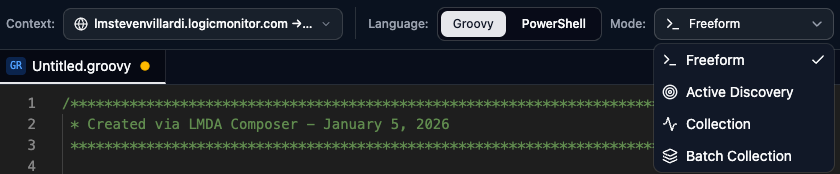
General Scripting & Testing
Best for: Testing, debugging, and exploration without output validation.
Freeform mode runs your script without any output format requirements. Use it when:
- Testing API calls or data retrieval
- Debugging script logic step-by-step
- Running maintenance or utility scripts
- Exploring collector capabilities
// Freeform example - just print outputdef devices = Snmp.walk("192.168.1.1", "1.3.6.1.2.1.1")devices.each { oid, value -> println "${oid} = ${value}"}return 0In Freeform mode:
- Parsed and Validation tabs are disabled
- Only Raw Output is available
- No format requirements apply
Instance Discovery
Best for: Writing and testing Active Discovery (AD) scripts for DataSources.
Active Discovery scripts return instance data that LogicMonitor uses to create monitoring instances.
Output Format
Section titled “Output Format”Each line represents one discovered instance:
instance_id##instance_nameinstance_id##instance_name##descriptioninstance_id##instance_name##description####prop1=value1&prop2=value2| Field | Required | Max Length | Rules |
|---|---|---|---|
| Instance ID | Required | 1024 chars | No spaces, =, :, \, or # |
| Instance Name | Required | 255 chars | Display name for the instance |
| Description | Optional | — | Optional description text |
| Properties | Optional | — | Auto-properties as key=value&key=value |
Example Script
Section titled “Example Script”// Discover network interfacesdef host = hostProps.get("system.hostname")def interfaces = Snmp.walk(host, "1.3.6.1.2.1.2.2.1.2")
interfaces.each { oid, name -> def index = oid.tokenize('.')[-1] // Format: id##name##description####auto.props println "${index}##${name}##Interface ${index}####auto.interface.index=${index}"}
return 0Validation Checks
Section titled “Validation Checks”The Validation tab reports:
- Valid — Instances with all required fields
- Error — Invalid instance IDs (empty, too long, invalid characters)
- Warning — Instance names exceeding 255 characters
- Total instance count in the tab header
Single-Instance Metrics
Best for: Writing collection scripts for single-instance DataSources.
Collection scripts output datapoint values as simple key-value pairs:
datapoint_name=numeric_valueExample Script
Section titled “Example Script”// Collect CPU metricsdef host = hostProps.get("system.hostname")def cpuOid = "1.3.6.1.2.1.25.3.3.1.2"def cpuValues = Snmp.walk(host, cpuOid)
def total = 0def count = 0cpuValues.each { oid, value -> total += value.toInteger() count++}
println "CpuUsage=${count > 0 ? total / count : 0}"println "CpuCount=${count}"
return 0Validation Rules
Section titled “Validation Rules”| Rule | Severity |
|---|---|
Must be key=value format | Error |
| Value must be numeric | Error |
| Invalid datapoint name characters | Warning |
| Non-matching lines ignored | Warning |
Multi-Instance Metrics
Best for: Writing batch collection scripts that handle multiple instances in a single execution.
Batch scripts output data for all instances at once, prefixed with the instance ID (wildvalue):
wildvalue.datapoint=numeric_valueExample Script
Section titled “Example Script”// Batch collect for all interfacesdef host = hostProps.get("system.hostname")def instances = datasourceinstanceProps.keySet()
instances.each { wildvalue -> def inOctets = Snmp.get(host, "1.3.6.1.2.1.2.2.1.10.${wildvalue}") def outOctets = Snmp.get(host, "1.3.6.1.2.1.2.2.1.16.${wildvalue}")
println "${wildvalue}.InOctets=${inOctets}" println "${wildvalue}.OutOctets=${outOctets}"}
return 0Execution Context
Section titled “Execution Context”When running in Collection or Batch Collection mode, a dialog prompts for additional context:
- Collection Mode: Enter the
wildvalue(instance ID) to simulate - Batch Mode: Enter the
datasourceIdto load all instance properties
This populates instanceProps (Collection) or datasourceinstanceProps (Batch) for your script.
Validation Rules
Section titled “Validation Rules”Same rules as Collection mode, plus:
- Wildvalue prefix is required on each line
- Wildvalue follows instance ID rules (no spaces,
=,:,\,#) - Maximum 1024 characters for wildvalue
Choosing the Right Mode
Section titled “Choosing the Right Mode”| Task | Recommended Mode |
|---|---|
| Testing SNMP/WMI queries | Freeform |
| Building discovery logic | Active Discovery |
| Single-instance DataSource | Collection |
| Multi-instance DataSource | Batch Collection |
| PropertySource script | Freeform |
| Debugging any script | Freeform |
| Module Type | Primary Mode |
|---|---|
| DataSource (AD script) | Active Discovery |
| DataSource (Collect script) | Collection or Batch |
| ConfigSource | Collection |
| PropertySource | Freeform |
| EventSource | Freeform |
| TopologySource | Freeform (Graph tab) |
Mode Indicators
Section titled “Mode Indicators”The current mode is displayed in multiple locations:
- Toolbar — Mode selector dropdown shows the active mode with its icon
- Status Bar — Mode badge displayed at the bottom of the editor window
- Tab Bar — Each tab shows its mode; switching tabs switches the active mode context