
API Explorer Overview
The API Explorer provides a built-in tool for exploring, testing, and learning the LogicMonitor REST API—without needing API tokens or external tools.
What Is the API Explorer?
Section titled “What Is the API Explorer?”| Feature | Description |
|---|---|
| Session Auth | Uses your active LogicMonitor session—no API tokens needed |
| Endpoint Catalog | Browse all available API endpoints organized by category |
| Request Builder | Build and execute requests with guided parameter input |
| Request History | Review past requests and reload them for quick retesting |
Opening the API Explorer
Section titled “Opening the API Explorer”| Method | Action |
|---|---|
| Welcome Screen | Click API Explorer on the welcome screen |
| Command Palette | Press Ctrl+K and type “API” |
| New Tab | Click + and select New API Request |
| Keyboard | Press Cmd+K, M to toggle to API view |
API Explorer Layout
Section titled “API Explorer Layout”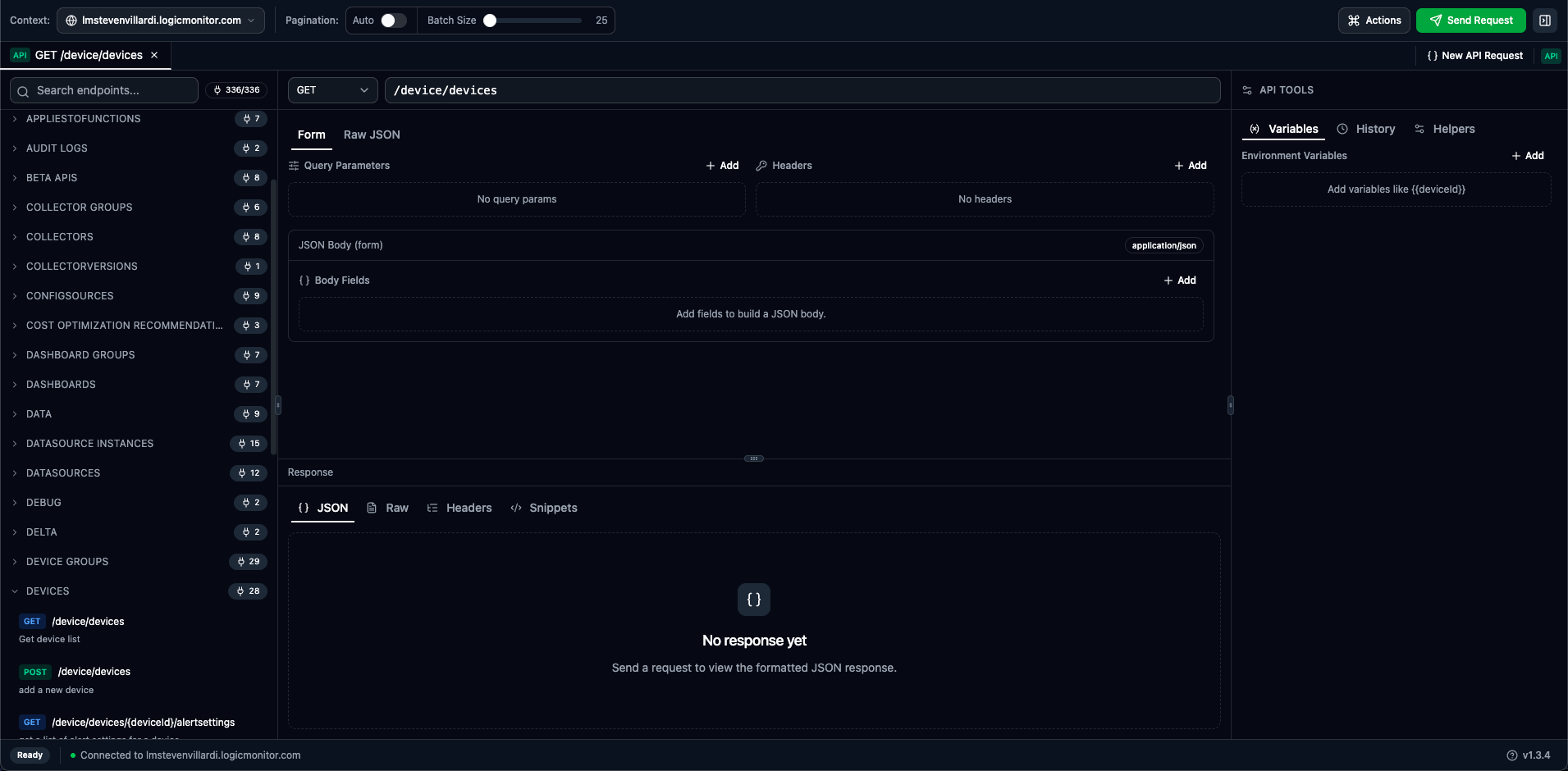
Main Panels
Section titled “Main Panels”| Panel | Description |
|---|---|
| Endpoint Catalog (left) | Browse and search all available API endpoints by category |
| Request Builder (center) | Method selector, endpoint path, query params, headers, and body |
| Response Viewer (center-bottom) | Formatted API response with multiple view modes |
| Tools Sidebar (right) | Variables, History, Helpers, and Docs tabs |
Tools Sidebar Tabs
Section titled “Tools Sidebar Tabs”The right sidebar provides four tabs:
| Tab | Description |
|---|---|
| Variables | Manage reusable environment variables for substitution |
| History | View and reload past API requests |
| Helpers | JSON path helpers to save response values as variables |
| Docs | View endpoint documentation with parameters, schemas, and auto-generated examples |
Key Features
Section titled “Key Features”Session-Based Authentication
Section titled “Session-Based Authentication”Unlike traditional API tools, you don’t need API tokens:
-
Log into LogicMonitor in your browser
-
Open LMDA Composer—it uses your session cookie
-
All API calls execute with your permissions automatically
Endpoint Documentation
Section titled “Endpoint Documentation”The Docs tab in the sidebar provides comprehensive endpoint documentation:
- Path Parameters — Required path variables with type information and descriptions
- Query Parameters — Optional query parameters with enum values and constraints
- Request Body Schema — Nested property details with types, required indicators, and constraints
- Example Generation — Auto-generated example payloads based on the schema
Select an endpoint from the catalog or enter a path to view its documentation automatically.
Endpoint Catalog
Section titled “Endpoint Catalog”The left panel lets you browse the complete LogicMonitor API:
- Organized by resource category (Devices, Alerts, Settings, etc.)
- Search across all endpoints by path, method, or description
- Click an endpoint to load it into the request builder
- See parameter requirements and example schemas
Request Building
Section titled “Request Building”Build requests with guidance:
- Method selector (GET, POST, PUT, PATCH, DELETE)
- Path autocomplete with endpoint suggestions
- Query parameter and header editors (Form mode)
- JSON body editor with syntax highlighting (Raw mode)
Response Viewer
Section titled “Response Viewer”Responses display in multiple formats:
| Tab | Content |
|---|---|
| JSON | Collapsible, syntax-highlighted JSON tree |
| Raw | Plain text response body |
| Headers | Response headers with copy functionality |
| Snippets | Generated code in cURL, Python, PowerShell, and Groovy |
API Tabs
Section titled “API Tabs”API requests open in tabs just like scripts:
| Indicator | Meaning |
|---|---|
| API | Tab contains an API request |
| • (dot) | Unsaved changes |
| Request name | Auto-generated from method and path (e.g., “GET /device/devices”) |
Work with multiple API requests simultaneously—each in its own tab. Compare responses side by side.
Supported Methods
Section titled “Supported Methods”| Method | Purpose |
|---|---|
| GET | Retrieve data from the API |
| POST | Create new resources |
| PUT | Replace/update entire resources |
| PATCH | Partial updates to resources |
| DELETE | Remove resources |
Quick Start Example
Section titled “Quick Start Example”Test your connection with a simple API call:
-
Open API Explorer
-
Method is GET (default)
-
Enter
/setting/versionas the endpoint -
Click Send Request
-
View the version response showing your portal’s API version
Permissions
Section titled “Permissions”API calls execute with your user permissions:
- Only see data you have access to
- Can only modify resources you can edit
- Admin endpoints require admin permissions
Rate Limiting
Section titled “Rate Limiting”LogicMonitor applies rate limits to API calls:
- Standard rate limits apply to all requests
- Response headers show remaining quota
- 429 Too Many Requests indicates rate limiting
The status bar shows response timing to help identify slow endpoints.
When to Use API Explorer
Section titled “When to Use API Explorer”- Learning the API — Explore endpoints interactively before writing automation code
- Quick Operations — Make one-off API calls without building full scripts
- Debugging — Test specific API calls to troubleshoot integration issues
- Data Export — Retrieve data for analysis, reporting, or migration